DATEV export
  1. Home
  2. For tax advisors

For tax advisors What arrives at the tax firm.

Which files a run hands over, in which format, with which number ranges and accounts, and in which order they are read into DATEV. The same details are in the handout the shop creates per tenant.

The handover

The files of one run.

The files belong to exactly one export run. For every run the shop keeps a list of all files with their SHA-256 checksum and a fingerprint across the booking and master data files; documents without an image are named individually in the run instead of going missing silently.

FileContentFormat
EXTF_Buchungsstapel_*.csvThe bookings of the period. Above 99,996 booking lines several files are created ("_01von03", "_02von03" …), each a complete batch with its own header and its own totals.EXTF 700, category 21, format version 13
EXTF_DebKred_Stamm_*.csvNames and addresses for the personal accounts when every customer gets a debtor of their own. Read in first.category 16, version 5
EXTF_Div-Adressen_*.csvThe addresses for the collective debtor with diverse addresses. Read in first.category 48, version 2
DATEV_Belege_*.zipThe document images as PDFs with a document.xml following the DATEV document schema. It contains exactly what the batch points to through its document links; at most 4,999 documents and 450 MB per package.ZIP for the document transfer

Header and character set

Header
advisor number, client number, start of the fiscal year, account length, period and label
Chart of accounts
SKR03 or SKR04, accounts with 4 to 8 digits
Interface
version 700, booking batch in format version 13
Character set
Windows-1252, CRLF line endings, semicolon separator
Freeze flag
set per tenant, off by default; written into every booking line (field 114)
Test export
labelled "Testexport" instead of "Export" in the header
Booking logic

Booking
debit debtor, credit revenue
Basis
documents (invoice, credit note, cancellation), not the order status
Taxation
accrual on the invoice date or cash basis on the payment date; OSS and EU business customers on the invoice date even under cash basis
Debtors
collective debtor, per payment method, with diverse addresses or one debtor per customer
Aggregation
one booking per document or collective bookings per day, account and tax key, then without document number and link
Cancellation
general reversal (field 118) or side switch
Cost centres
KOST1 and KOST2 (fields 37 and 38) according to stored rules
Document numbers

The number ranges in the document field.

TransactionWhat the document field holds
Invoices, credit notes, cancellationsthe document number from the shop in document field 1, cleaned to the characters DATEV accepts, at most 36
Incoming payments, with the payment exportthe invoice number of the settled invoice for open-item matching; without an invoice "Z-" before the order number
Refunds, with the payment exportthe number of the credit note or cancellation document, dated on the refund date
Document field 2stays empty on purpose, because it has a fixed meaning for open-item clients
Document link (field 20)the reference to the document image in the document ZIP
Import

Into DATEV in this order.

  1. Do not open or save the CSV files with Excel: Excel changes the character set and the number format, after which the file can no longer be imported.
  2. If debtor master data or diverse addresses are included, read them in first - without them the numbers in the batch are unknown.
  3. Read the booking batch into DATEV Rechnungswesen through the DATEV format import, with several files each one on its own.
  4. Read the document packages in through the document transfer, in any order; the document link connects booking and image.
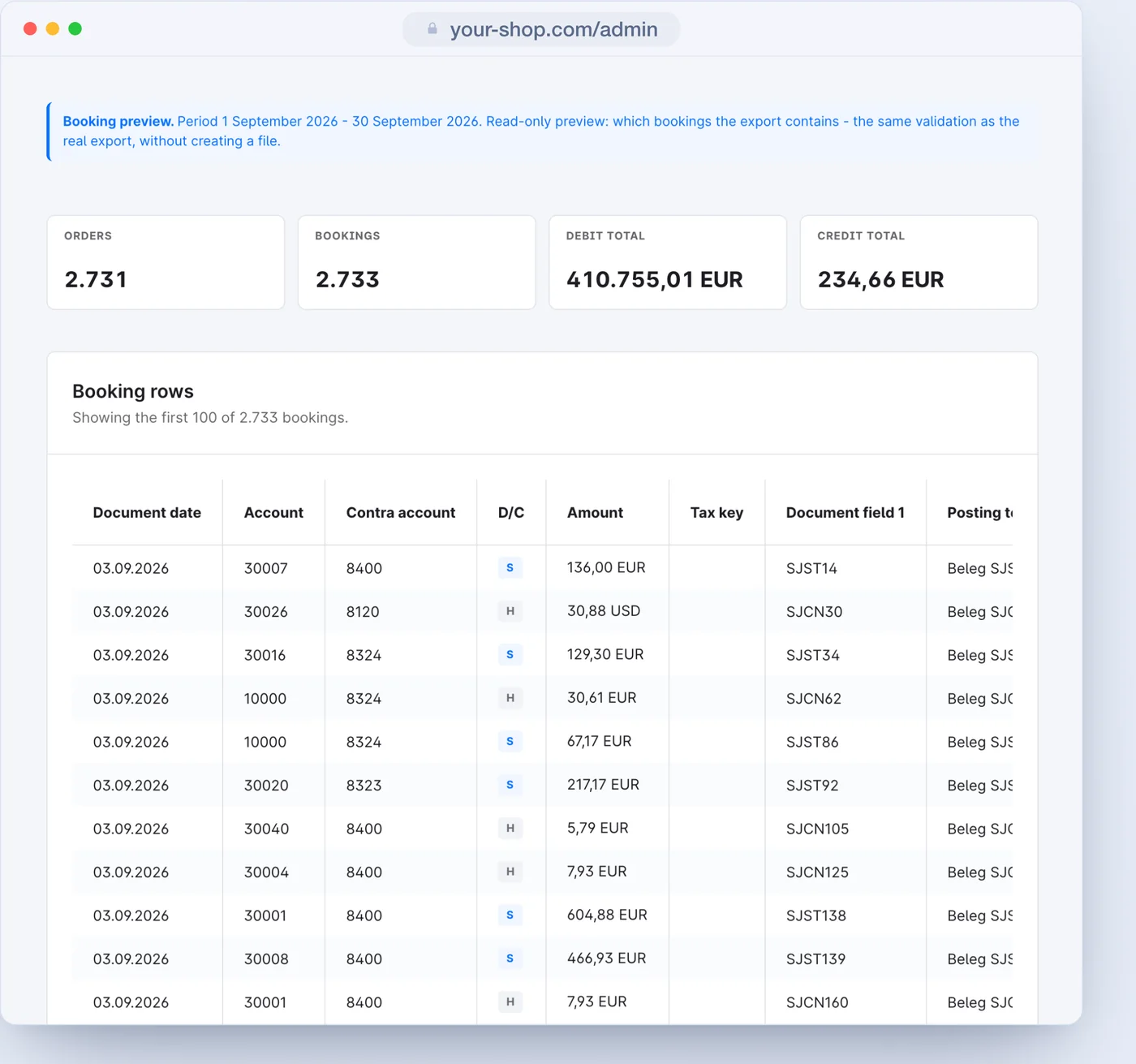
The preview of the booking lines in the admin: document date, account, contra account, debit or credit, amount, tax key, document field 1 and posting text
For looking at the bookings there is the preview in the admin; the CSV file stays unchanged.

What the export does not contain

  • payment provider fees and their collective payouts to the bank account
  • cash discounts, partial payments and payment differences
  • dunning and an open-item list
  • revenue from marketplaces or other systems outside the shop

These transactions belong in the bookkeeping and are recorded there.

Assumptions to agree on

  • The OSS threshold monitoring counts every taxable EU B2C sale - for a pure service shop it warns rather too early, never too late.
  • The statutory threshold of €10,000 is fixed; the setting can only bring the warning forward.
  • Great Britain counts as outside the EU; deliveries with the state Northern Ireland are named separately in the check report, the country code XI stops.
  • Revenue belongs to the tenant through its sales channels; agree on a later reassignment beforehand.
The handout

All of it as a PDF, per tenant.

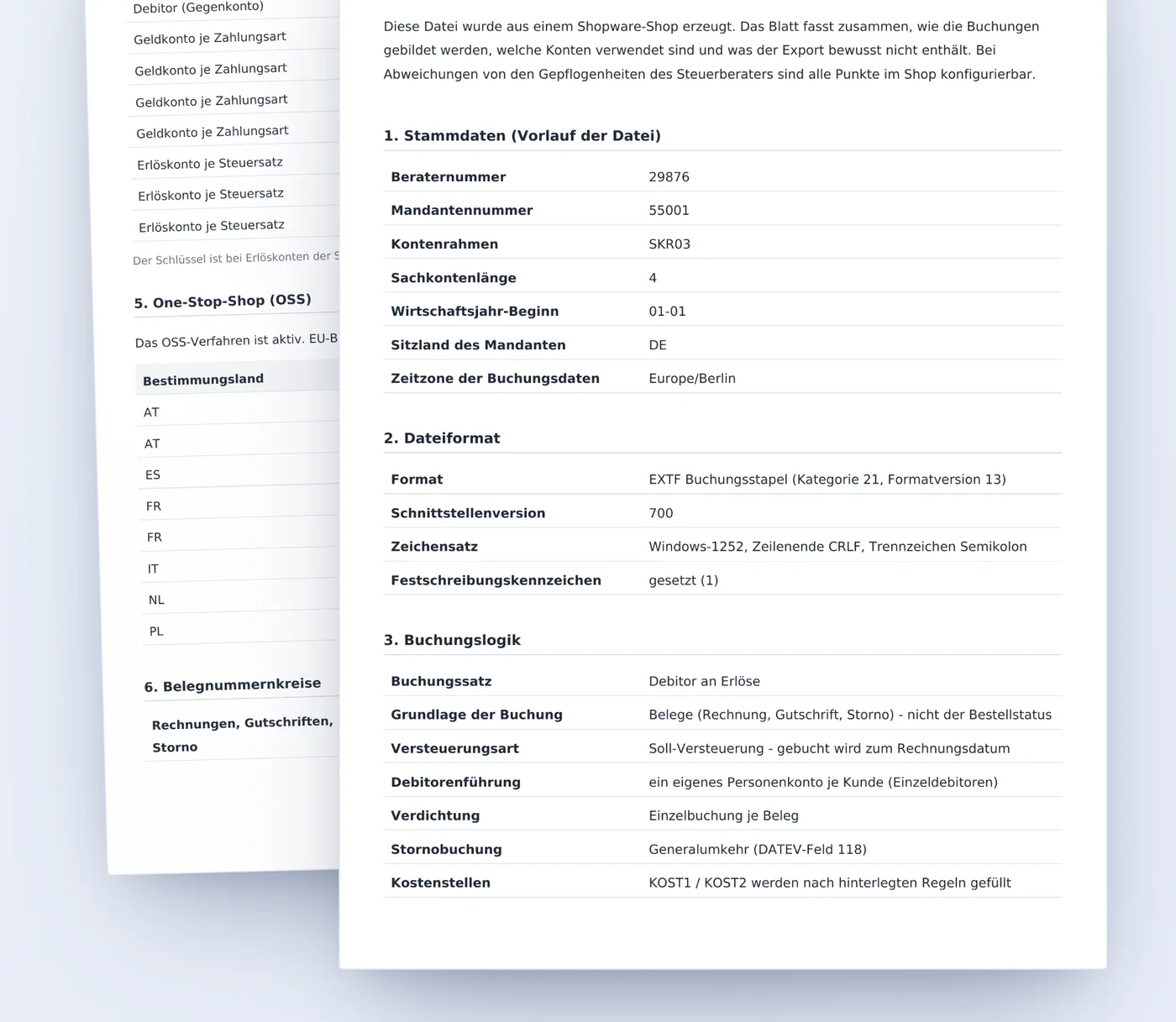
The shop creates the handout, in German, with one click on the Export page, with the real values of the tenant: advisor number, accounts in use, OSS method, number ranges. Ten sections, from the file header to the import into DATEV.

The DATEV export handout with master data, file format and booking logic
Questions from tax firms

What tax firms ask before the first import.

Can the file be tested before switching over?

Yes. The test export writes a real, complete file whose header says "Testexport" instead of "Export". It locks nothing and can be repeated as often as needed - the right way for a trial import and a reconciliation.

Are the batches frozen on import?

Only if you want that. The freeze flag is set per tenant and is off by default; it is written into every booking line (field 114), so that DATEV does not freeze the batch on its own.

What happens above 99,996 bookings?

The export writes several complete files, ending in _01von03, _02von03 and so on, each with its own header and its own reconciliation totals. Each file is imported on its own; together they make up the period.

How do the document images reach the booking?

Through the document packages: one ZIP per package with a document.xml following the DATEV document schema and the PDFs. Imported through the document transfer, the document link in field 20 connects booking and image automatically.

Which charts of accounts and account lengths are possible?

SKR03 and SKR04, with general ledger accounts of four to eight digits. A new tenant starts with SKR03 and four digits.

Who answers questions about accounts and keys?

The shop owner - every point in the handout can be set in the shop. The protocol of each run shows for every document which tax case applied, which date and which account were used, and why a document was skipped.