Shopware's CSV export
It has no tax keys, no debtor accounts and no document field. Whatever is missing gets rebuilt in Excel.
The plugin turns your shop's invoices, credit notes and cancellations into a finished DATEV booking batch for your tax firm: with debtors, document images and a protocol that explains every booking. Every month by itself, if you want.
Free in the Shopware Store How to set it up
25 invoices a month stay free, with no end date.
The figures have to get out of the shop and into the books. The usual ways there cost time and create errors.
It has no tax keys, no debtor accounts and no document field. Whatever is missing gets rebuilt in Excel.
The tax firm types the figures in from the invoices. That is slow and costs time at the firm.
As soon as OSS, cash-basis taxation, the small-business rule or credit notes come in, it is manual rework again.
Afterwards nobody knows why a figure is in the file. Every question turns into a search through the orders.
Set it up once, agree it with the tax firm, then the same way every month.
your-shop.com/admin
Period
August 2026September 2026Custom period
From01.08.2026
To31.08.2026
The document date counts. Already exported documents are skipped automatically; the file is then ready to download from the run and is kept in the history.
Start the export
Create previewShows totals and rows. Produces no file and locks no Beleg - the history lists it as a preview.
Create test exportProduces a real, complete file for checking. The run does not count as an export and the documents stay free - the file header says "Testexport".
Create exportBinding: writes the file and locks the documents against a second export.
Advisor info sheet (PDF)The info sheet summarises for the tax advisor how bookings are formed, which accounts and document-number circles are used, what the export deliberately leaves out and how to import the file. Best handed over together with the first file.
The assistant asks for what DATEV needs in five steps.
DATEV's standard accounts are suggested for the revenue accounts.
Shows documents, bookings and totals without creating a file.
A real file that locks nothing, for the tax firm's trial import.
By hand or on a schedule; the schedule emails the file to the tax firm.
The basis is the Shopware document, not the order: the invoice, the credit note, the cancellation invoice. It is the view your tax firm takes anyway.

Not as a special route, but as a normal setting on the tenant. What the export cannot assign with certainty it does not guess; it reports it.
One revenue account per EU destination country or a collective account with a tax key, separate for goods and electronic services.
Booked on the real payment date from the status history; OSS and EU business customers stay on the invoice date.
Revenue under § 19 UStG onto its own account, as a switch on the tenant.
Tax-free intra-community supply and reverse charge to companies with a VAT ID, onto accounts of their own.
Tax-free exports onto their account; a taxed delivery outside the EU is reported separately.
The credit note corrects the revenue; the refund books only when money was really paid back.
The amount in the document currency with the rate, plus the base amount in euros.
Shipping and vouchers split across the rates Shopware calculated, onto accounts of their own if wanted.
Every payment against its invoice on the day it was paid, even when PayPal pays out in bulk.
What comes out is the booking batch in the EXTF format that your tax firm can import directly, and everything that belongs with it.
EXTF_Buchungsstapel_1234_20260901-20260930.csv
"EXTF";700;21;"Buchungsstapel";13;20260916171236000;;"";"DvsnDatev";"";12345;1234;20260101;4;20260901;20260930;"Testexport 2026/09";"";1;0;0;"EUR";;"";;;"03";;;"";""Umsatz (ohne Soll/Haben-Kz);Soll/Haben-Kennzeichen;WKZ Umsatz;Kurs;Basis-Umsatz;WKZ Basis-Umsatz;Konto;Gegenkonto (ohne BU-Schlüssel);BU-Schlüssel;Belegdatum;Belegfeld 1;Belegfeld 2;Skonto;Buchungstext;Postensperre;Diverse Adressnummer;Geschäftspartnerbank;Sachverhalt;Zinssperre;Beleglink;Beleginfo - Art 1;Beleginfo - Inhalt 1;Beleginfo - Art 2;Beleginfo - Inhalt 2;Beleginfo - Art 3;Beleginfo - Inhalt 3;Beleginfo - Art 4;Beleginfo - Inhalt 4;Beleginfo - Art 5;Beleginfo - Inhalt 5;Beleginfo - Art 6;Beleginfo - Inhalt 6;Beleginfo - Art 7;Beleginfo - Inhalt 7;Beleginfo - Art 8;Beleginfo - Inhalt 8;KOST1 - Kostenstelle;KOST2 - Kostenstelle;Kost-Menge;EU-Land u. UStID (Bestimmung);EU-Steuersatz (Bestimmung);Abw. Versteuerungsart;Sachverhalt L+L;Funktionsergänzung L+L;BU 49 Hauptfunktionstyp;BU 49 Hauptfunktionsnummer;BU 49 Funktionsergänzung;Zusatzinformation - Art 1;Zusatzinformation- Inhalt 1;Zusatzinformation - Art 2;Zusatzinformation- Inhalt 2;Zusatzinformation - Art 3;Zusatzinformation- Inhalt 3;Zusatzinformation - Art 4;Zusatzinformation- Inhalt 4;Zusatzinformation - Art 5;Zusatzinformation- Inhalt 5;Zusatzinformation - Art 6;Zusatzinformation- Inhalt 6;Zusatzinformation - Art 7;Zusatzinformation- Inhalt 7;Zusatzinformation - Art 8;Zusatzinformation- Inhalt 8;Zusatzinformation - Art 9;Zusatzinformation- Inhalt 9;Zusatzinformation - Art 10;Zusatzinformation- Inhalt 10;Zusatzinformation - Art 11;Zusatzinformation- Inhalt 11;Zusatzinformation - Art 12;Zusatzinformation- Inhalt 12;Zusatzinformation - Art 13;Zusatzinformation- Inhalt 13;Zusatzinformation - Art 14;Zusatzinformation- Inhalt 14;Zusatzinformation - Art 15;Zusatzinformation- Inhalt 15;Zusatzinformation - Art 16;Zusatzinformation- Inhalt 16;Zusatzinformation - Art 17;Zusatzinformation- Inhalt 17;Zusatzinformation - Art 18;Zusatzinformation- Inhalt 18;Zusatzinformation - Art 19;Zusatzinformation- Inhalt 19;Zusatzinformation - Art 20;Zusatzinformation- Inhalt 20;Stück;Gewicht;Zahlweise;Forderungsart;Veranlagungsjahr;Zugeordnete Fälligkeit;Skontotyp;Auftragsnummer;Buchungstyp;USt-Schlüssel (Anzahlungen);EU-Land (Anzahlungen);Sachverhalt L+L (Anzahlungen);EU-Steuersatz (Anzahlungen);Erlöskonto (Anzahlungen);Herkunft-Kz;Buchungs GUID;KOST-Datum;SEPA-Mandatsreferenz;Skontosperre;Gesellschaftername;Beteiligtennummer;Identifikationsnummer;Zeichnernummer;Postensperre bis;Bezeichnung SoBil-Sachverhalt;Kennzeichen SoBil-Buchung;Festschreibung;Leistungsdatum;Datum Zuord. Steuerperiode;Fälligkeit;Generalumkehr (GU);Steuersatz;Land;Abrechnungsreferenz;BVV-Position;EU-Land u. UStID (Ursprung);EU-Steuersatz (Ursprung);Abw. Skontokonto161,54;"S";"";;;"";10000;8320;"0240";0309;"SJST29";"";;"Beleg SJST29";;"20018";;;"";"BEDI ""01a0688f-7533-712d-bcea-52ed65e67e7f""";"";"";"";"";"";"";"";"";"";"";"";"";"";"";"";"";"";"";;"FR";20,00;"";;"";;;;"";"";"";"";"";"";"";"";"";"";"";"";"";"";"";"";"";"";"";"";"";"";"";"";"";"";"";"";"";"";"";"";"";"";"";"";"";"";"";"";;;;"";;;;"SJ000029";"";;"";;;;"";"";;"";;"";;"";"";;"";;0;;;;"1";;"FR";"";;"";;35,82;"H";"";;;"";10000;8400;"";0309;"SJCN168";"";;"Beleg SJCN168";;"20033";;;"";"BEDI ""01a0688f-c13c-7271-a799-0b87d15f0ab9""";"";"";"";"";"";"";"";"";"";"";"";"";"";"";"";"";"";"";;"";;"";;"";;;;"";"";"";"";"";"";"";"";"";"";"";"";"";"";"";"";"";"";"";"";"";"";"";"";"";"";"";"";"";"";"";"";"";"";"";"";"";"";"";"";;;;"";;;;"SJ000168";"";;"";;;;"";"";;"";;"";;"";"";;"";;0;;;;"";;"";"";;"";;426,47;"S";"";;;"";10000;8125;"";0309;"SJST225";"";;"Beleg SJST225";;"20015";;;"";"BEDI ""01a0688f-dfea-7225-9ed5-0ace77aa6179""";"";"";"";"";"";"";"";"";"";"";"";"";"";"";"";"";"";"";;"ATU12345675";;"";;"";;;;"";"";"";"";"";"";"";"";"";"";"";"";"";"";"";"";"";"";"";"";"";"";"";"";"";"";"";"";"";"";"";"";"";"";"";"";"";"";"";"";;;;"";;;;"SJ000225";"";;"";;;;"";"";;"";;"";;"";"";;"";;0;;;;"1";;"AT";"";;"";;23,55;"S";"";;;"";10000;8400;"";0309;"SJST287";"";;"Beleg SJST287";;"";;;"";"BEDI ""01a06890-045f-709c-96d5-638571476094""";"";"";"";"";"";"";"";"";"";"";"";"";"";"";"";"";"";"";;"";;"";;"";;;;"";"";"";"";"";"";"";"";"";"";"";"";"";"";"";"";"";"";"";"";"";"";"";"";"";"";"";"";"";"";"";"";"";"";"";"";"";"";"";"";;;;"";;;;"SJ000287";"";;"";;;;"";"";;"";;"";;"";"";;"";;0;;;;"1";;"";"";;"";;95,89;"S";"";;;"";10000;8320;"0240";0309;"SJST312";"";;"Beleg SJST312";;"20018";;;"";"BEDI ""01a06890-1328-7334-9fe9-fb67beb6d877""";"";"";"";"";"";"";"";"";"";"";"";"";"";"";"";"";"";"";;"FR";20,00;"";;"";;;;"";"";"";"";"";"";"";"";"";"";"";"";"";"";"";"";"";"";"";"";"";"";"";"";"";"";"";"";"";"";"";"";"";"";"";"";"";"";"";"";;;;"";;;;"SJ000312";"";;"";;;;"";"";;"";;"";;"";"";;"";;0;;;;"1";;"FR";"";;"";;146,51;"S";"";;;"";10000;8400;"";0309;"SJST389";"";;"Beleg SJST389";;"20004";;;"";"BEDI ""01a06890-4379-736e-a476-8683fc7ae734""";"";"";"";"";"";"";"";"";"";"";"";"";"";"";"";"";"";"";;"";;"";;"";;;;"";"";"";"";"";"";"";"";"";"";"";"";"";"";"";"";"";"";"";"";"";"";"";"";"";"";"";"";"";"";"";"";"";"";"";"";"";"";"";"";;;;"";;;;"SJ000389";"";;"";;;;"";"";;"";;"";;"";"";;"";;0;;;;"1";;"";"";;"";;182,99;"S";"";;;"";10000;8320;"0240";0309;"41299";"";;"Beleg 41299";;"20001";;;"";"BEDI ""01a068ab-7901-711e-aa33-829bad5d89db""";"";"";"";"";"";"";"";"";"";"";"";"";"";"";"";"";"";"";;"FR";20,00;"";;"";;;;"";"";"";"";"";"";"";"";"";"";"";"";"";"";"";"";"";"";"";"";"";"";"";"";"";"";"";"";"";"";"";"";"";"";"";"";"";"";"";"";;;;"";;;;"SJ000400";"";;"";;;;"";"";;"";;"";;"";"";;"";;0;;;;"";;"FR";"";;"";;
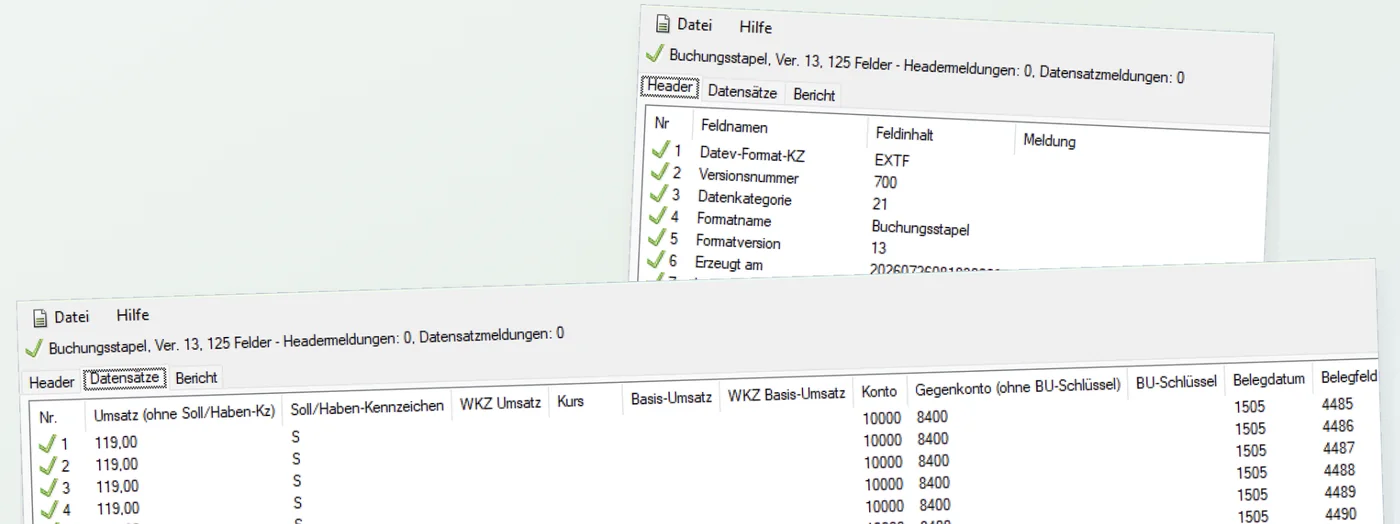
On 27 August 2026 a real, binding export ran through the test program DATEV provides for its format. Result: no objection. The report read every header field the way it is meant.
The format check says that DATEV can read the file. Whether the bookings fit professionally is settled with the test export and your tax firm.
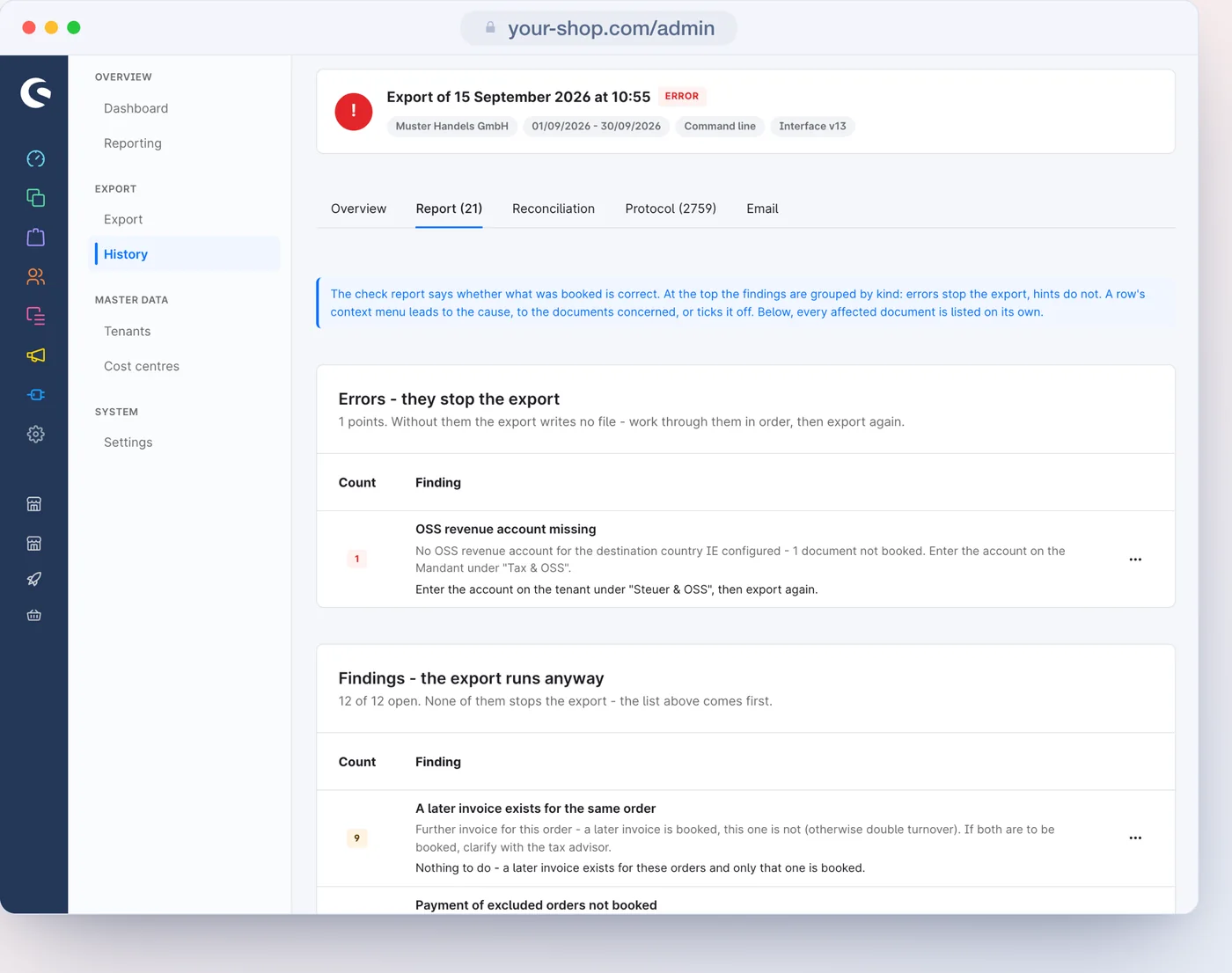
If the run finds something that would make a booking wrong, it writes nothing: no half file, no document locked. After the fix you simply run it again.
Works through the period without creating a file: documents, bookings and the debit and credit totals.
A real, complete file that locks nothing and can be repeated as often as needed.
Every finding by severity; notices can be ticked off. An error stops the export, a notice does not; each names the way to fix it.
Every document with its outcome and reason, tax case, date and account; on top, the run checks itself for completeness.
A scheduled task exports the period that is due and sends the file to the tax firm. You can see in the history that it worked.
$ bin/console dvsn-datev:export --month=2026-08

DATEV export
------------
 Mandant         Muster Handels GmbH (…)
 Sales channels  2
 Period          2026-08-01 - 2026-08-31

 Bookings                       1311
 Booking volume (Soll + Haben)  642.180,50 EUR
 Run id                         …

 [OK] File stored: EXTF_Buchungsstapel_55001_2026…
 [OK] Master data stored: EXTF_Div-Adressen_55001_…
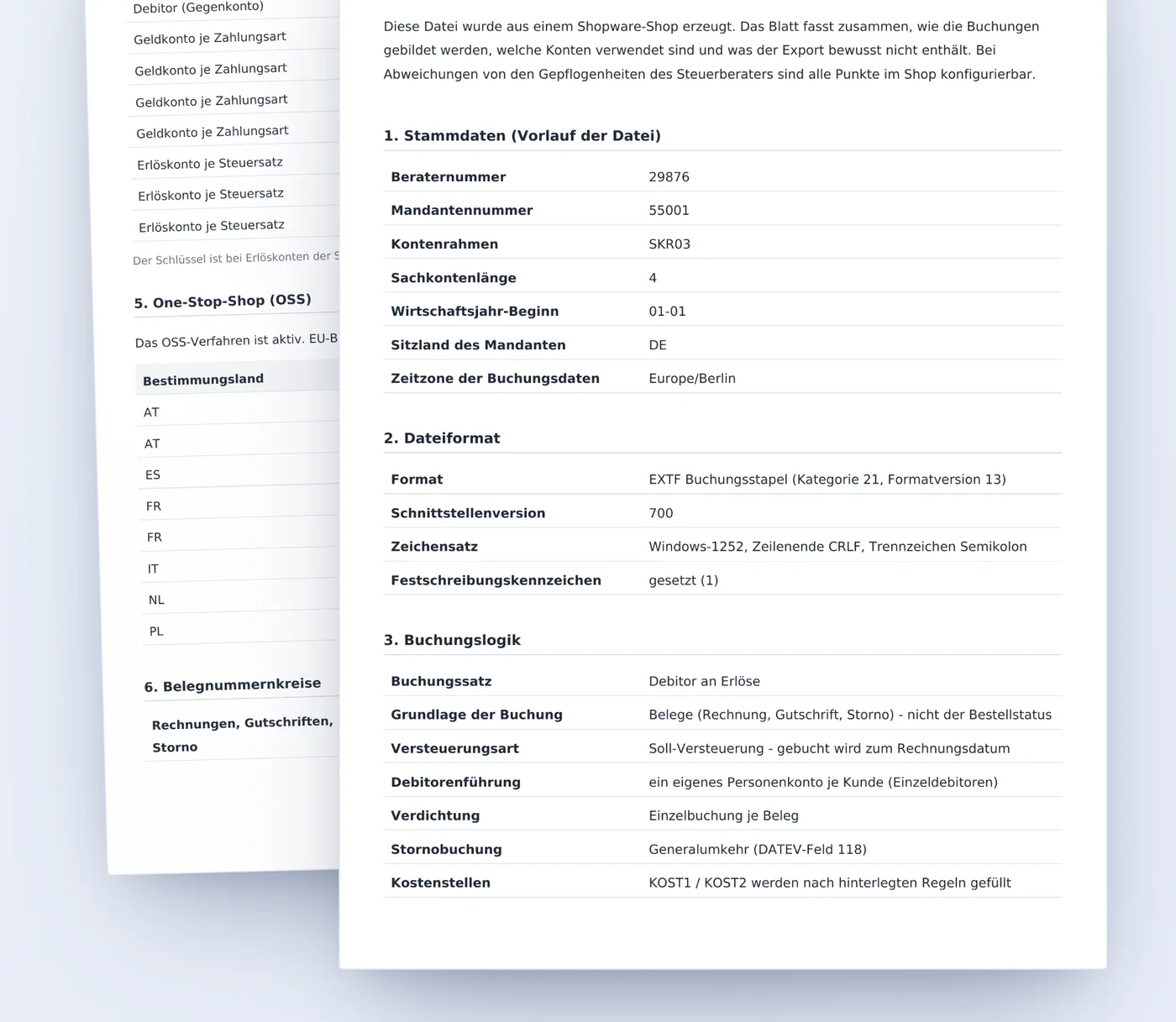
One click on the export page creates a handout per tenant as a PDF, in German for the tax firm: master data, format, booking logic, every account in use and what the export deliberately leaves out. That way the agreement with the firm starts with an answer instead of a question.
A binding run cannot be changed quietly. Every figure in the file traces back to the order.
Every binding export locks its documents and links itself into an unbroken chain.
A duplicate check across all runs: by default a second export of the same period books nothing again.
Every file handed over carries a SHA-256 checksum, plus a fingerprint across all booking and master data files of the run.
The process is the same in every plan. The plan decides how many invoices a month go into the file and which settings take effect.
€0
For beginners and small merchants who export a limited number of invoices a month by hand.
Included
€499 / year€49.90 / month
For smaller companies that work with it productively - small businesses included.
Everything from Free, plus:
€999 / year€99.90 / month
For most shops: the export runs by itself on a schedule, including setup and an email to the tax firm.
Everything from Starter, plus:
€1,499 / year€149.90 / month
For large companies and groups, with several tenants and unlimited invoices.
Everything from Business, plus:
Free costs nothing and does not expire. You book the other plans as an in-app purchase in the Shopware Store, yearly or monthly; yearly they are 17% cheaper. All prices plus statutory VAT.
Yes, as soon as your tax firm is meant to receive a booking batch it can import. Shopware's CSV export has no tax keys, no debtor accounts and no document field. The plugin writes the booking batch in the EXTF format that DATEV reads in, together with document images and debtors.
Yes, an interface through the file: the plugin writes the booking batch in the DATEV format (EXTF, interface version 700) that your tax firm imports into DATEV Rechnungswesen. You download the file from the run history and pass it on, or the schedule emails it to your tax firm; no online connection to DATEV is needed for that.
Yes, that is what the test export is for: a real, complete file that locks nothing and can be repeated as often as needed. Your tax firm imports it on a trial basis and reconciles it. A handout, one click away on the export page, explains every convention of the file to the firm.
A binding export locks its documents. A second export of the same period does not book them again unless you explicitly switch that on; a duplicate check runs across all runs. Preview and test export lock nothing.
Yes. Everything that concerns the bookkeeping belongs to a tenant: its own accounts, its own advisor and client number, its own schedule. The separation runs through the sales channels, and each tenant exports only what belongs to it.
Yes, regardless of the size of the shop. Large periods run step by step in small portions and are joined at the end; an interrupted run carries on where it stopped. A booking batch that is too large is split into several files, and the document images into several ZIP packages, each along the limits DATEV sets.
Yes. The basis is the documents in Shopware, not a log that starts on the day of installation. A catch-up run over past months or a whole fiscal year is possible at any time.
You download it in the run history, or the schedule mails it to the firm. A binding run also includes the document packages as a ZIP and, with diverse addresses or individual debtors, the master data file.
SKR03 and SKR04, with general ledger accounts of four to eight digits. For the revenue accounts DATEV's standard accounts are suggested; debtor and cash accounts come from your tax firm.
Only what lives in Shopware is booked. Payment provider fees, payouts and chargebacks appear on the bank statement, not in the order, so the export leaves them to the bookkeeping. Part payments without a reliable amount are named in the check report instead of being booked with the full amount.
The plugin creates booking data according to the DATEV conventions and shows in the protocol how every booking came about. The professional and legal responsibility stays with your tax advisor, which is exactly what the test export and the handout are for.
Up to 25 invoices a month it is free, with no end date. Starter costs €49.90 a month, Business €99.90, Enterprise €149.90; paid yearly it is €499, €999 and €1,499. Plus VAT.
Set it up once with your tax firm, and with the schedule the monthly handover reaches your tax firm every month at the same hour.